How to Book Restaurant Reservations Without the Hassle
Learn how to book restaurant reservations with practical timing, scripts, and backup plans that save time and reduce friction
Lifestyle13 min read

You're trying to book a Saturday dinner while replying to a work message, checking a swim-lesson pickup time, and explaining that one guest needs a wheelchair-accessible table and another has a serious nut allergy. The restaurant's first available slot doesn't work, the waitlist requires a text response, and the cancellation policy is buried behind the booking button.
That's why learning how to book restaurant reservations is less about clicking “Reserve” and more about managing a small logistics operation. The booking is only the first action. You also need to choose the right channel, preserve flexibility, track the confirmation, monitor alternatives, and close the loop if plans change.
Why Booking a Table Has Become an Operational Skill
A reservation can begin with a quick search and end with several open tasks. Diners compare available times, enter contact details, accept deposit terms, receive confirmation, and continue watching reminders, waitlists, and text alerts. The table is secured only when those details remain accurate through arrival.
That change is reflected in diner behavior. Online reservations in June 2021 were 42% higher than in June 2019, while walk-in visits declined by more than 6%, according to OpenTable's analysis of how diners book reservations. Online availability has become a standard starting point, while the follow-through still belongs to someone.
The hidden work starts after the booking
A parent may secure a table and still need to confirm wheelchair access, ensure an allergy is recorded, add the event to a family calendar, watch for a better time, and account for a delayed swim lesson. Each task protects a different part of the evening.
The operational loop usually includes:
- Availability checking: A preferred time can disappear while the rest of the evening is being coordinated.
- Waitlist monitoring: A text alert may expire during a meeting or while someone is driving.
- Policy control: Missing a deadline can mean losing a deposit or paying a cancellation charge.
- Headcount changes: Adding a guest may require a different table configuration.
- Travel coordination: The venue's local time, arrival window, and contact number matter away from home.
Restaurants also manage scarce seating with increasingly deliberate systems. Reporting on OpenTable's growth and restaurant distribution documents online reservation marketplaces becoming an established operating channel, rather than a simple convenience for diners.
Practical rule: Treat every reservation as a live logistics record, not a completed form.
A venue can use BonusQR restaurant loyalty to build ongoing customer relationships, but the immediate booking still needs accurate confirmation and controlled changes. A useful delegation model assigns the post-booking follow-through to an Assistant team: it monitors alternatives, tracks deadlines, records requirements, and handles updates. The diner's only remaining task is to show up.
The objective is not merely finding a table. It is keeping the evening on schedule without making the diner manage every handoff.
Decide What You Actually Need Before You Book
The fastest reservation requests are specific before they reach a restaurant. Before opening a platform or calling a host stand, define the constraints that can't move and the preferences that can.
Start with the venue or area. “Somewhere downtown” may be enough for casual planning, but it creates unnecessary back-and-forth when travel time, parking, school pickup, or a show is involved. Name the neighborhood, restaurant, or acceptable radius first.
Then establish the date and flexibility window. A Saturday reservation may mean one exact date, or it may mean any evening from Friday through Sunday. Those are very different searches. If the occasion is fixed, identify the acceptable seating range, such as early dinner through a later seating, rather than insisting on one exact minute.
Lock the operating details first
Use this pre-booking checklist:
- Location: Which restaurant, neighborhood, or travel radius works?
- Date: Is the date fixed, or can you use an adjacent evening?
- Party size: How many people will attend?
- Seating: Dining room, bar, outdoor table, quiet corner, high chair, or accessible layout?
- Requirements: Are there allergies, dietary restrictions, mobility needs, or celebration details?
- Cancellation boundary: What is the latest time you can cancel or modify without accepting a fee or losing a deposit?
The last item is frequently ignored. It shouldn't be. A reservation that works only if every meeting, flight, childcare handoff, and traffic condition goes perfectly may be a poor reservation even if the restaurant is excellent.
For example, a dual-career household booking for four on Saturday might define the request this way: a restaurant in the city center, Saturday evening, four guests, wheelchair-accessible seating, one nut allergy, any time from early evening through later dinner, and a cancellation deadline that the household can realistically meet. That single brief is much easier to act on than a stream of separate messages asking about one time, then another, then accessibility.
Flexibility expands the feasible answer
Restaurant demand regularly exceeds available capacity, and reservation systems commonly account for no-shows, cancellations, and walk-ins when setting booking limits. Research on restaurant revenue management and reservation controls explains why early decisions about flexibility improve the odds of finding an acceptable table.
Don't confuse flexibility with accepting anything. Define your minimum standard, then widen only the variables that can move. A family may reject bar seating but accept an earlier meal. A business dinner may require a quiet table but allow several dates. Those decisions should be made before a host has to guess what you mean.
Choosing the Right Booking Channel for the Situation
A reservation is an operational loop, not a one-click transaction. The channel you choose affects what inventory you can see, how quickly you receive confirmation, and how much follow-through remains after the booking.
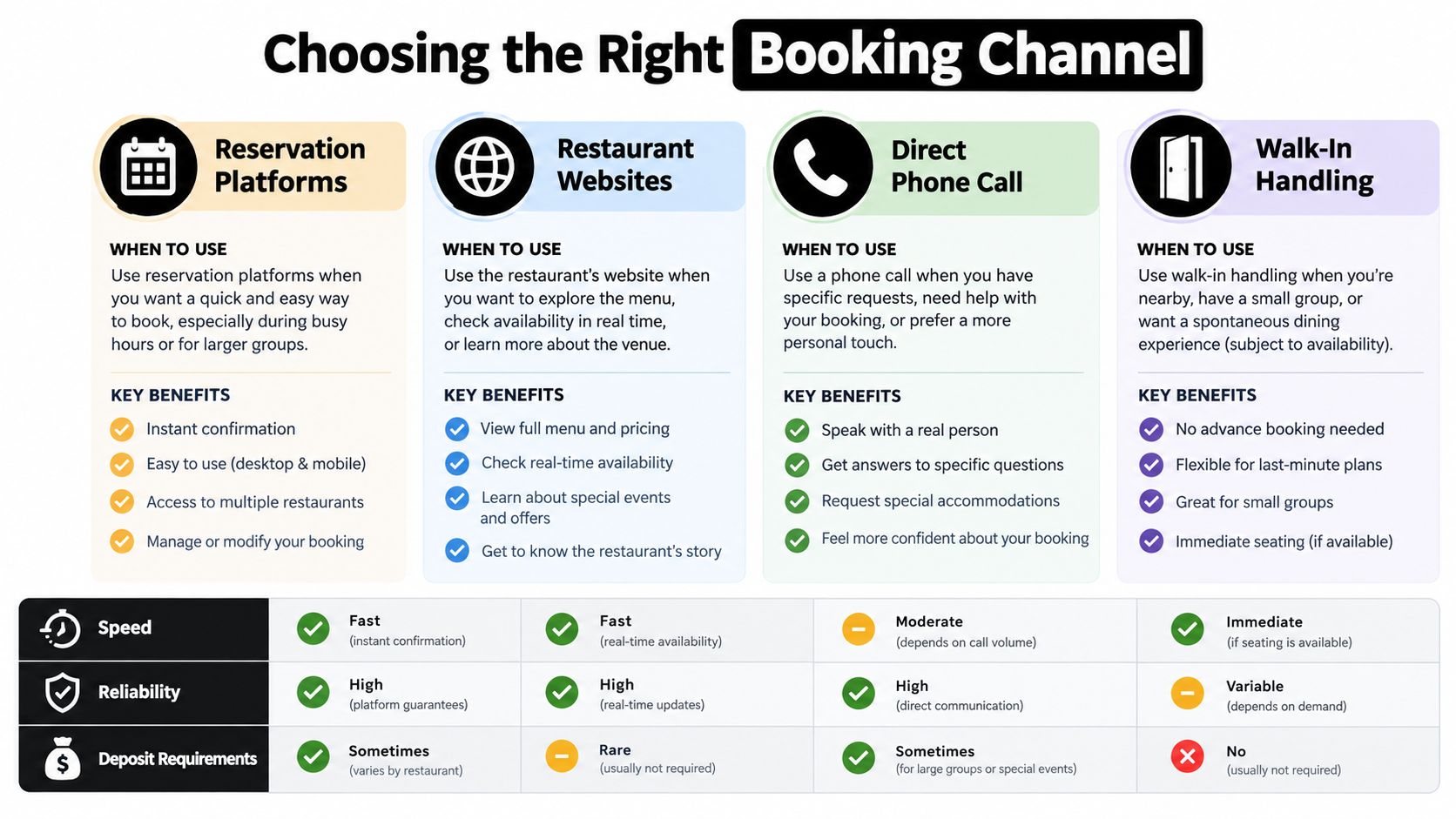
Reservation platforms
Platforms are the fastest first check for prime-time searches, especially when you are comparing dates, party sizes, or nearby restaurants. They often provide immediate confirmation, waitlists, and a written record of changes.
Their limitation is incomplete inventory. Restaurants may divide availability among their own websites, booking platforms, social channels, and phone lines. Historical reporting on reservation distribution supports a practical warning: two channels may show different tables for the same night. Check another route before treating a sold-out result as final.
Restaurant websites
The restaurant's website is the better source for menu details, policies, event seating, and booking rules. It may list tasting-menu requirements, accessibility information, deposit terms, or arrival limits that a marketplace omits.
The trade-off is comparison speed. You may need to use a separate booking tool, and exceptions may still require a call. Use the site when the venue's own terms matter more than searching many restaurants at once.
Direct phone calls
Call when the request includes accessibility, an allergy, a large group, a complicated arrival, or a seating question that a form cannot capture. A host can assess whether a table works, explain how the kitchen handles a restriction, and tell you whether the restaurant keeps a cancellation list.
Call outside the dining rush whenever possible. A clear request made before service gives the team time to check details instead of forcing a rushed answer.
Walk-ins
Walk-ins are a fallback unless the restaurant is built around them. They work when you can change the time, seating, or venue and have another nearby option. Do not make one your only plan for a birthday, client dinner, or meal before a performance.
For digital booking workflow context, 10Seat booking insights explains how online tools can support reservation handling. A digital concierge service can absorb the post-booking follow-through, including confirmations, changes, and waitlist checks, so the diner only needs to show up.
Use this channel rule:
- Small party, flexible time: Start with a platform.
- Prime time or high-demand venue: Check the platform, then the restaurant website.
- Accessibility, allergies, or unusual seating: Call directly.
- Large party or complicated event: Use a phone call or written restaurant contact.
- No availability anywhere: Ask about a waitlist and keep a walk-in fallback.
Timing the Request So You Actually Get the Table
Last-minute booking isn't automatically careless. It can work when the meal is off-peak, the party is small, or you can accept several time bands. It performs poorly when the date is fixed, the venue is popular, and the desired seating falls inside the busiest dinner window.
A Forbes-cited survey of full-service restaurant reservations found that 52% of reservations were made less than 24 hours before the meal, while nearly 25% were made with less than two hours' notice. That tells you late requests can succeed, not that late requests are dependable.
Match lead time to the type of meal
Same-day booking is reasonable when the occasion is ordinary and your flexibility is wide. You may find an opening at an earlier dinner time, a later seating, a bar seat, or a restaurant with a large dining room.
Plan earlier when the meal has several constraints. A fixed Saturday, a larger group, a tasting menu, an accessibility requirement, or a deadline after dinner all shrink the available options. The more conditions you stack together, the less useful a single-slot search becomes.
Instead of refreshing a sold-out 7:30 p.m. table, search the surrounding bands. Try 5:00, 6:00, and 7:00 p.m. as starting points, then look earlier or later according to the evening's actual constraints. If 7:00 p.m. is unavailable, 5:30, 6:00, or 8:30 may solve the same transportation and childcare problem well enough.
The survey identified 6:00 p.m. as the most common reservation-making time, followed by 7:00 p.m. and 5:00 p.m., but that describes when diners submit requests, not guaranteed availability. The restaurant's seating pattern matters more than the clock time when you happen to search.
Use the waitlist as a monitoring system
A waitlist only helps if someone monitors it. Join the official list, keep the relevant phone nearby, and respond promptly to alerts. If the system asks you to confirm within a limited window, treat that message like an expiring task rather than a casual notification.
For high-demand meals, book the best acceptable time first, then join the waitlist for the preferred slot. That creates a fallback without requiring repeated searches. If the preferred opening appears, cancel the original booking through its original channel immediately, after confirming the replacement.
For a more focused set of tactics, last-minute restaurant reservations can help you think through the trade-off between urgency and flexibility. The goal isn't to chase a perfect time indefinitely. It's to secure an acceptable solution while preserving a path to improve it.
Scripts and Messages That Move a Host Stand
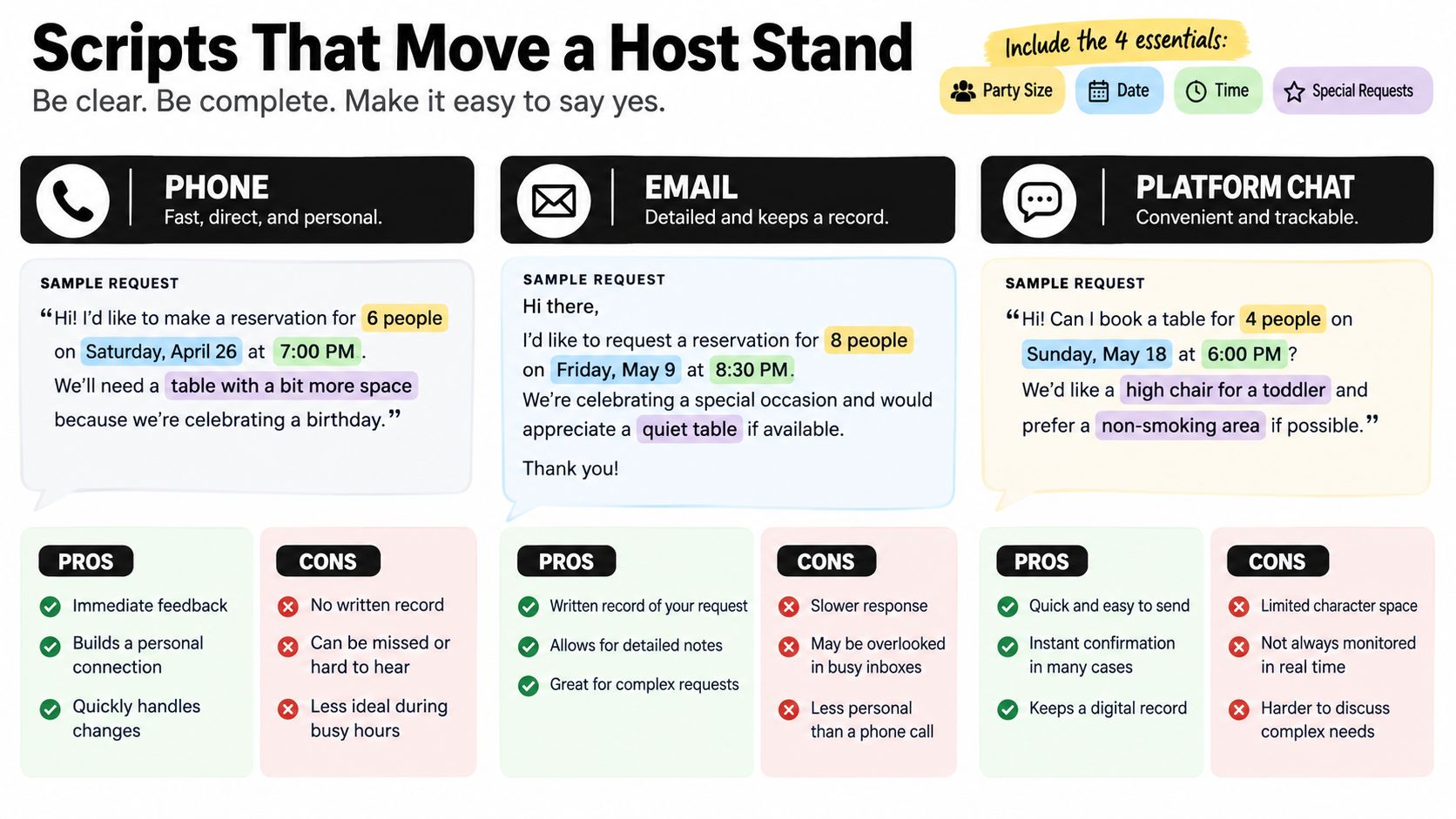
Hosts need enough information to evaluate the request, but not a long personal history. A clear message gives the restaurant something workable: your name, party size, date, preferred time, flexibility, and any requirement that changes the seating decision.
Practical reservation guidance identifies the guest name, party size, preferred date, and preferred time as the core details, with accessibility, allergy, and seating needs shared before arrival.
A phone script that leaves room for action
Try this:
“Hi, this is Jordan Lee. I'm looking for a table for four on Saturday, June 15. Our first choice is 7:00 p.m., but we can also do 6:00 or 8:30. One guest uses a wheelchair, and another has a nut allergy. Do you have a table that can accommodate both needs?”
That script works because it gives the host a defined request and acceptable alternatives. It also puts operational details before the booking is finalized, when the restaurant can still assess whether the table and kitchen setup are appropriate.
The same request in writing
For email or platform chat, use a compact format:
Subject: Table for four on Saturday, June 15
“Hello, I'm Jordan Lee requesting a table for four on Saturday, June 15. We'd prefer 7:00 p.m., but 6:00 or 8:30 also works. One guest uses a wheelchair, and one guest has a nut allergy. Please let me know which seating can accommodate these requirements, along with any deposit or cancellation terms. My mobile number is [number].”
A platform message can be shorter:
“Jordan Lee, four guests, Saturday, June 15. Preferred time 7:00 p.m., flexible at 6:00 or 8:30. One wheelchair user and one nut allergy. Please confirm suitable seating and the cancellation policy.”
What to include and what to avoid
- State the party size: “Four guests” is more useful than “a small group.”
- Give a flexible range: Alternate times let the host solve the request.
- Name the requirement plainly: “One guest uses a wheelchair” is clearer than “special seating needed.”
- Ask about policy before confirming: Deposits and cancellation terms affect the decision.
- Provide a reachable contact: The restaurant needs a way to handle changes.
- Don't overexplain: Share what affects seating, kitchen preparation, or timing.
- Don't promise an exact arrival if you can't keep it: Ask about the permitted lateness instead.
Once the booking exists, reminder language can help keep the task visible. Resources such as appointment reminder text templates offer adaptable wording for confirmations and follow-ups.
Confirmation, Waitlists, and Cancellation Discipline
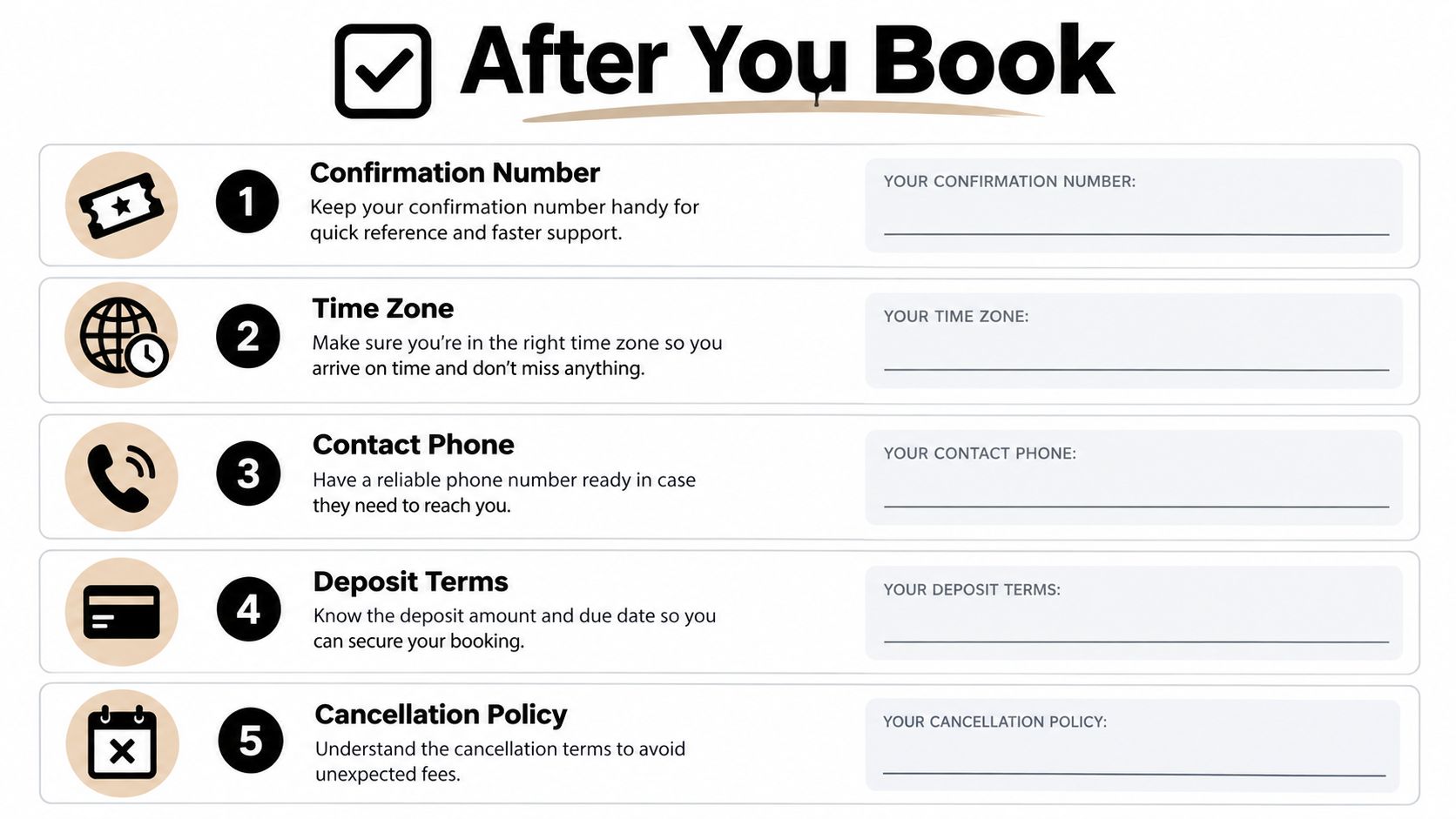
The reservation isn't operationally complete until the details are recorded somewhere you'll see them. Save the confirmation number, restaurant phone, venue time zone, party size, deposit or card-hold requirement, permitted lateness, and exact cancellation cutoff.
Build the reminder sequence
Use two calendar reminders:
- Several days before: Recheck the date, time, party size, travel plan, and special requirements.
- On the cancellation deadline: Decide whether the reservation still works and modify or cancel if it doesn't.
A same-day check should confirm that the booking still reflects the correct guest count and needs. This matters for groups because changing from four guests to five may require a different table, deposit, or seating arrangement.
The risk isn't theoretical. OpenTable has reported that 28% of Americans failed to honor a restaurant reservation during the previous year, while published restaurant research has observed no-show rates from 3% to as high as 40% on special occasions in studied settings, as summarized in OpenTable's discussion of no-shows.
Treat the waitlist as an active commitment
Joining a waitlist creates a second operational task. Record the restaurant, requested time, party size, and alert method. If a text arrives, decide quickly whether the new opening is better than the existing reservation, then update the original booking rather than accumulating duplicate inventory.
Holding backup reservations can also create avoidable problems. Keep a fallback only when you can cancel it within the stated terms and when the alternatives serve a genuine logistics need. Once one option wins, release the others promptly.
If plans change, cancel through the original channel and request written acknowledgment when the policy or deposit is significant. For a delayed arrival, contact the restaurant directly with the updated estimated time. Don't assume that a platform notification reaches the host stand quickly enough.
The useful standard: Every reservation should have an owner, a deadline, and a documented next action.
A disciplined record protects more than money. It preserves credibility with the venue, prevents a family or team from arriving with conflicting information, and turns a vague evening plan into a manageable sequence of decisions.
Reclaim Your Evenings with an Operational Booking Loop
The complete process is straightforward when you treat it as a loop:
- Define the venue, date, party size, seating needs, flexibility, and cancellation boundary.
- Check the platform, restaurant website, or direct phone channel that fits the request.
- Search several acceptable time bands instead of one fragile slot.
- Book the best acceptable option and join the official waitlist if improvement is worthwhile.
- Capture the confirmation, policy, contact number, time zone, and party size.
- Calendar the review and cancellation deadlines.
- Reconfirm requirements, respond to alerts, and release unwanted bookings promptly.
The problem is that this loop repeats across family dinners, client meals, travel days, birthdays, and meetings in unfamiliar cities. Each task looks small, but the follow-up consumes attention because it arrives through different channels and at inconvenient times.
Delegation changes the economics
A practical delegation model assigns the entire loop to an Assistant team while leaving judgment with the member. The Assistant can research suitable venues, present a short list, book the selected option, record the policy, monitor the waitlist, handle confirmation messages, update guest counts, and escalate only decisions that require approval.
That is the distinction between submitting a request and removing operational noise. The member still decides whether an earlier table is acceptable, whether a dietary constraint is essential, or whether a backup reservation should be released. The Assistant team handles the repetitive coordination around those decisions.
Restaurant reservation management is useful to think about as a repeatable operating system rather than a single booking event. The same record can hold preferred neighborhoods, seating habits, arrival constraints, family requirements, and communication preferences, provided someone maintains it accurately.
Approved Lux Personal Assistant offers this model through a US-based Assistant team with 24/7 access by phone, SMS text, or email. It handles restaurant reservations and related follow-up, including preferences, backup options, delayed-arrival notes, and confirmations. The service uses Triple-channel access, and Proactive Preference Learning allows the team to adapt to established routines over time.
Delegation checklist: Give the Assistant the occasion, acceptable restaurants, date window, party size, seating requirements, flexibility, budget boundary, cancellation tolerance, and the exact point at which you want a decision escalated.
For a household, that can mean one parent no longer carries every dinner-related message, calendar edit, and policy deadline. For a founder or frequent traveler, it can mean restaurant logistics stop competing with client work and transit problems. The payoff isn't the reservation itself. It's the reclaimed attention after the reservation has been made.
A monthly subscription makes sense when the same coordination problem appears repeatedly and hiring a full-time employee would add more overhead than capacity. The right comparison is not whether you can personally click through a booking form. You can. The better question is whether clearing the follow-up loop from your week is worth delegating.
Approved Lux Personal Assistant gives you a US-based Assistant team for restaurant reservations, confirmations, waitlist monitoring, and related logistics through phone, SMS text, or email. Visit Approved Lux Personal Assistant to see whether delegating the entire reservation loop would reclaim time from your evenings.
Updated