How to Track Monthly Expenses: A Step-by-Step Guide
Learn how to track monthly expenses in five steps: set goals, sort recurring and variable spend, choose a review cadence, and delegate admin time.
10 min read

In the Federal Reserve's 2024 household survey, 59% of adults experienced at least one major unexpected expense during the prior 12 months. That figure changes how to track monthly expenses. You're not building a prettier record of the past. You're building a workflow that flags what needs funding, review, or follow-up before it becomes urgent, and you can measure whether it's working in hours reclaimed.
Why Monthly Tracking Breaks Down Before Month-End
In 2025, 34% of U.S. adults surveyed by Bankrate said they tracked their spending during the prior 30-day period, according to the Bankrate survey report. Most households therefore start from memory or a quick glance at a bank app. Neither shows what's already committed, what's irregular, or what still needs a decision.
Two failure modes explain most abandoned logs. The first is unfinished tracking, where receipts pile up, cash purchases disappear, and reconstruction gets slower every week. The second is tracking without a decision, where totals get recorded and nothing gets cancelled, renegotiated, funded, or assigned.
The Time Trade-Off
Say you spend two to three hours at month-end rebuilding transactions from statements. A 30-minute weekly routine usually recovers most of that time in the first cycle because you're reconciling while details are fresh. I would judge the system by that return, not by how detailed the spreadsheet looks.
Start narrow. Choose the one card or account used for most daily purchases and commit to logging it for 30 days.
The Monthly Expense Log Template to Copy
Use a simple spreadsheet or notes app table that works on your phone and laptop. Give every transaction one row and eight fields. That structure turns a pile of charges into work you can assign and close.
Field | What to Enter | Example Entry |
|---|---|---|
Date | Date the charge posted | Mar 3 |
Merchant | Payee as shown on the statement | Pacific Power |
Amount | Final amount paid, in dollars | 96.40 |
Account | Card, bank account or cash used | Joint checking |
Category | One of the eight broad categories | Utilities |
Type | Recurring, variable or irregular | Recurring |
Owner | Person responsible for the item | Partner A |
Status | Open, reviewed or resolved | Reviewed |
What Each Field Does
Date is the day the charge posted, not the day you remember it. Merchant should match the statement exactly, so you can reconcile without guessing. Amount is the final amount paid, including tax and tip.
Account names the card, bank account, digital wallet, or cash used. Category uses eight broad groups only, Housing, Utilities, Food, Transportation, Healthcare, Insurance, Debt, and Other. Put childcare, education, discretionary wants, and miscellaneous spending in Other rather than inventing new groups midmonth.
Type matters because it separates a predictable bill from a one-off repair before totals distort the picture. Owner names who's responsible for checking, disputing, or following up. Status shows whether the row is open, reviewed, or resolved.
Practical rule: If a row has no owner and no status, it's not tracked yet. It's just stored.
Keep two rules from day one. First, keep transfers and credit card payments out of spending totals, since the purchase is the expense. Second, record cash purchases the same day, even as a quick phone note you transfer later.
A sample row reads Mar 3, Pacific Power, 96.40, Joint checking, Utilities, Recurring, Partner A, Reviewed. A complete first week looks like that for every transaction, with nothing sitting in an unlabeled pile. If you're comparing tools before you build it, review these budget tracking tools against the eight fields, not against charts you'll never open.
Sorting Recurring, Variable and Irregular Spending
Sort by behavior before you judge the amount. Recurring costs repeat on a fixed schedule, such as rent, insurance premiums, phone plans, and streaming subscriptions. Variable costs change month to month, such as groceries, fuel, and restaurants. Irregular costs arrive once or unpredictably, such as car repairs, a school trip fee, or a medical copay.
The Bureau of Labor Statistics 2024 expenditure release shows housing at 33.4% of average annual household spending, transportation at 17.0%, food at 12.9%, personal insurance and pensions at 12.5%, and healthcare at 7.9%. Together they accounted for 83.7% of average annual expenditure of $78,535. Treat those shares as population averages, not targets for your household.
Category | Share of Spending | Usual Cost Type | Tracking Focus |
|---|---|---|---|
Housing | 33.4% | Recurring | Rent or mortgage, utilities, repairs |
Transportation | 17.0% | Mixed | Fuel and insurance recurring, repairs irregular |
Food | 12.9% | Variable | Groceries and restaurants |
Personal insurance and pensions | 12.5% | Recurring | Premiums and pension contributions |
Healthcare | 7.9% | Irregular | Copays, deductibles and prescriptions |
All five categories | 83.7% | Mixed | Start tracking here |
Turn Irregular Bills Into Monthly Amounts
Say an annual insurance premium is $1,200. Record a $100 monthly provision and move it into a sinking fund line each month, even though the bill arrives once. Your monthly baseline then reflects the actual cost of staying insured.
Volatility isn't an edge case. In the Philadelphia Federal Reserve's April 2025 LIFE Survey, 49.6% of respondents reported at least one financially disruptive event during the prior 12 months, with significant nonmedical expenses affecting 23.9% and significant healthcare expenses 15.5%. Plan a reserve line instead of assuming a clean month.
Sort one full month into the three types, then check which category holds the largest share. Don't create extra categories to explain every surprise. Granularity feels precise, but it raises maintenance cost and rarely improves the decision.
How to Run the Monthly Tracking Routine
The visual below compresses the routine into four moves you repeat every cycle.
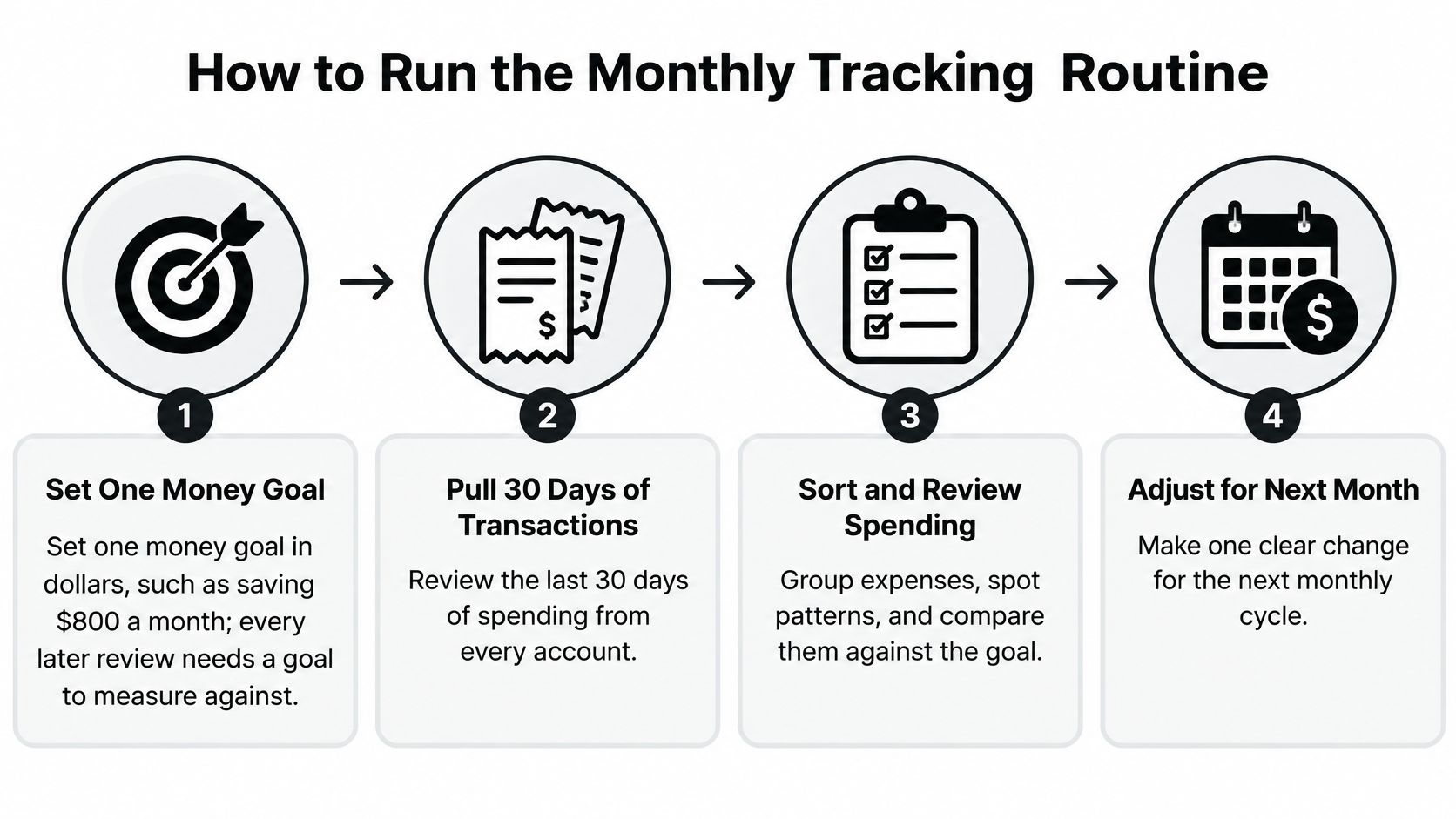
- Set one money goal in dollars. For example, save $800 a month. The common slip is setting no goal, so every later review has nothing to measure against.
- Pull 30 days of transactions from every account. Include bank accounts, cards, cash, and digital wallets. People usually skip the wallet or the least used card, and that's where gaps start.
- Log each transaction with all required fields. Amount alone won't tell you who owns a dispute or whether a charge repeats. It also helps to organize receipts by week so paper proof matches the log.
- Reconcile every Friday for about 30 minutes. Match the log to statements, mark duplicates, reclassify transfers, and check refunds. Done weekly, this stays short. Left to month-end, it becomes hours of detective work.
- Total each category at month-end. Compare it with last month and with a rolling three-month average. One month can mislead you, especially after travel, repairs, or school costs.
- Compare income with spending on one line. In 2025, 45% of Americans surveyed by the Marist Poll said their income approximately matched their monthly expenses, while 29% said expenses exceeded income each month, per the Marist Poll money survey. Income minus spending tells you immediately which side you're on.
- Choose one action per review. Cancel an unused subscription, lower a category limit, renegotiate a bill, or move money into a sinking fund. If you want a structured way to find waste in your monthly budget, start with recurring charges you no longer use.
- Write a one-line summary. Note the biggest variance, the action taken, and anything to watch next month.
Your Two Checklists
- Weekly: Log every new transaction, reconcile against statements, mark duplicates, transfers, and refunds, and enter the week's cash tally.
- Monthly: Total categories, compare with last month and the three-month average, check income against spending, choose one action, and write the summary.
A finished month has no open rows without an owner, no unexplained category spike, and one decision you can point to.
Common Tracking Problems and How to Fix Them
The most common first-month problem is double counting a credit card. You log the grocery purchase, then log the card payment as spending too, and your total inflates. Tag card payments as transfers and count only purchases.
Symptom | Likely Cause | Fix |
|---|---|---|
Monthly total is higher than the bank shows | Credit-card payment counted as spending | Tag card payments as transfers and count only purchases |
Totals jump in one month | Annual or quarterly bill not spread across the year | Divide the bill by 12 and fund a sinking-fund line each month |
Cash spending is missing | Cash not recorded at purchase | Keep a weekly cash tally and enter it at the Friday review |
Duplicate charges appear | Subscription or refund counted twice | Mark duplicates during reconciliation and dispute merchant errors |
Log falls behind after two weeks | Too many categories | Merge back into the eight broad categories |
Surprise repair or medical bill | No irregular-expense reserve | Set aside a reserve line calculated from essential monthly spending |
An annual or quarterly bill landing in one month needs spreading, not panic. Divide it by 12 and fund it monthly so your baseline stays honest. Missing cash needs a weekly tally entered on Friday, because same-day perfection won't survive a busy week.
Duplicate charges and refunds need marking during reconciliation, then a dispute if the merchant erred. A log that falls behind after two weeks usually has too many categories, so merge back to eight. A surprise repair signals a missing irregular expense reserve, which you should size from your essentials total.
Shared spending needs its own rule. When one person pays and another reimburses, record a reimbursement row, not a second expense. That keeps the category total clean and shows who still owes whom.
Any row without an owner or a status is the first thing to clear at the next review.
Finish with an emergency test. After totaling essentials, check whether savings, or a card you'd pay off at the next statement, could cover a $400 emergency and a $500 expense. In the Federal Reserve's 2024 survey, 63% of adults said they could cover a hypothetical $400 emergency using cash, savings, or a credit card paid off with the next statement, and 55% reported having funds for three months of expenses. If you fail that test, build the reserve line before you fine tune anything else.
Hand Off the Admin Work and Measure What You Reclaim
Once the routine works, the bottleneck usually isn't knowledge. It's ownership of receipts, renewals, reimbursements, and follow-ups.

Delegate tasks that need persistence more than judgment, collecting and filing receipts, researching vendors and comparing prices, summarizing monthly expenses, following up on reimbursements, and auditing subscriptions for renewals. Keep approvals, ambiguous charge decisions, and anything needing personal sign-off with you. That split reduces operational noise without giving up control.
Metrics That Prove It Is Working
- Hours per week reclaimed: Keep a two-week time log before and after delegating, then compare totals.
- Share of admin tasks delegated: For example, four of nine recurring weekly tasks equals 44%.
- Exceptions resolved within 48 hours: Count duplicate charges, missing receipts, and renewal questions closed on time.
- Unexpected bills per quarter: Fewer surprises means sinking funds and renewal checks are working.
Say a solo practitioner spends three hours a week on expense admin. That's about 156 hours a year, nearly four full working weeks. Even reclaiming half changes what that person can bill, build, or stop carrying mentally.
The short video below is useful if you want to see the handoff framed as workflow rather than bookkeeping.
Approved Lux can take receipt routing, vendor research, and expense summaries through call, text, or email, working alongside your accounts rather than inside them. We never log into members' email or calendar accounts, and both plans include a step-by-step onboarding intake so preferences and approval rules are clear. You keep classification and spending decisions. For recurring close work, compare that model with a monthly bookkeeping service and choose based on who will chase exceptions, not who produces the neatest report.
Start Your Expense Log This Week
Do three things this week, in order. First, pick the account that carries most daily spending and set one dollar goal, such as saving $800 a month. A narrow start beats a complete system you abandon by day ten.
Second, build the log with the eight fields and book a 30-minute reconciliation every Friday. Put it on the calendar like a meeting, with an owner if you share expenses. The appointment is what turns logging into control.
Third, after one full month, compare admin hours in week one with week four. List tasks that could move to someone else, receipt filing, renewal checks, reimbursement follow-ups, and monthly summaries. Let those logged hours decide whether delegation makes sense.
Treat help as a measured test, not a leap of faith. Your time log either shows a return or it doesn't.
If the numbers support a handoff, Approved Lux offers a 7-day trial of Lux Solo for $9.99, after which Lux Solo is $99.99 per month, about $3.33 a day. Lux Solo and Lux Circle are month-to-month and can be cancelled at any time. Use the trial only if your first month shows admin work worth removing, and judge it by hours returned and exceptions closed, not by promised savings.
If expense admin is eating hours you should spend on clients or family, Approved Lux Personal Assistant gives you a US-based Assistant team by call, text, or email to route receipts, chase reimbursements, audit renewals, and prepare monthly summaries while you keep every approval. Start with your first month's time log, hand off the tasks it exposes, and measure the hours you get back.