How to Create an Agenda for a Meeting in 2026
Learn how to create an agenda for a meeting with clear goals, time-boxed topics, owners and a shared template that keeps discussions focused.
11 min read
The usual advice is to list your topics and send them before the meeting. That's a start, but it doesn't tell anyone what they're expected to decide or deliver. To create an agenda for a meeting that leads to action, treat it as an execution record: every line should name the decision it supports, the person responsible, and the output you need afterward.
Why Most Agendas Fail Before the Meeting Starts
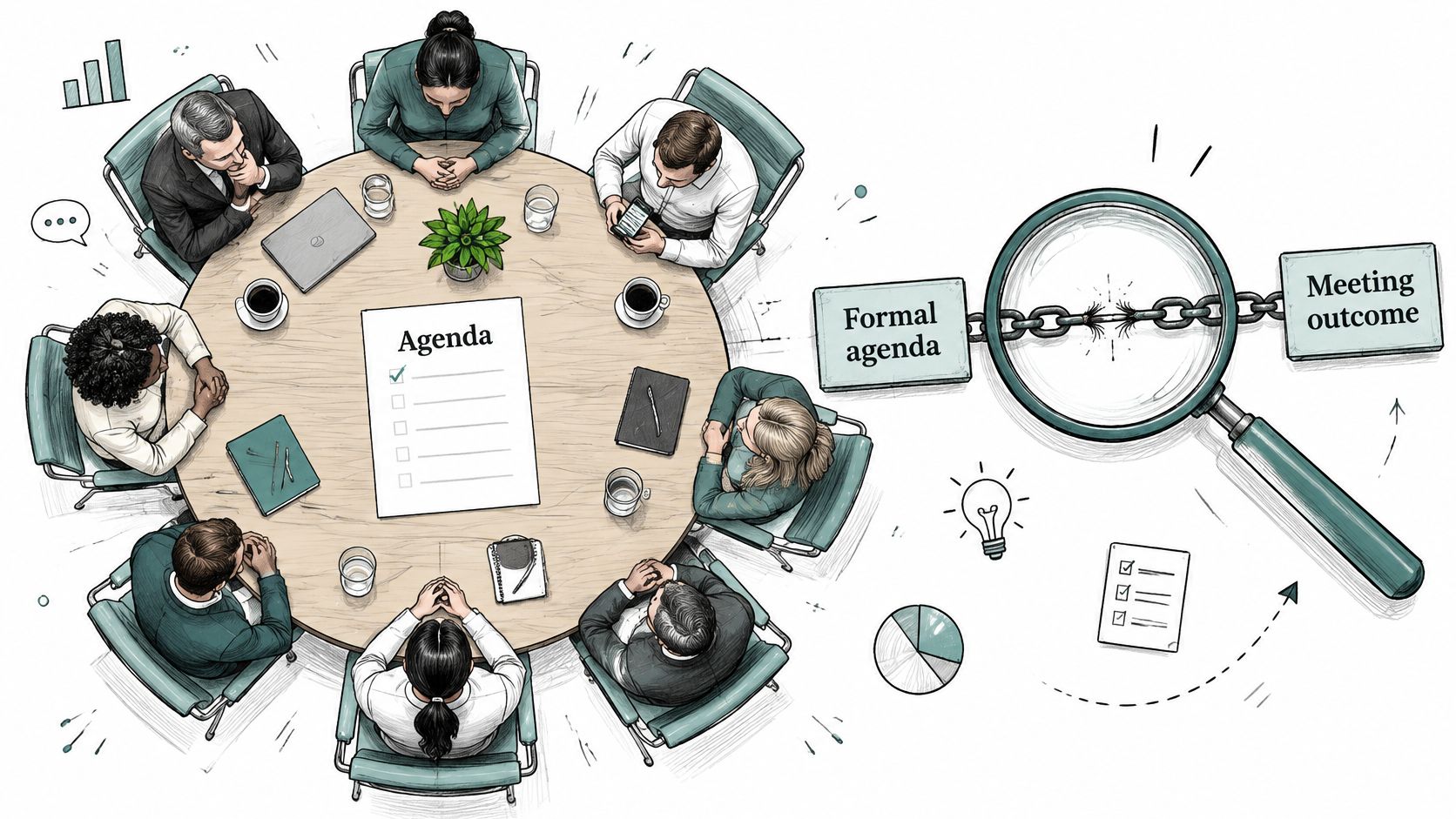
A formal agenda helps less than its reputation suggests. The Chartered Institute of Personnel and Development's 2023 evidence review found only small positive correlations between formal agendas and perceived meeting effectiveness, ranging from r = .14 to .18; distributing an agenda in advance was also associated with only small improvements.
The practical lesson isn't to abandon agendas. It's to stop expecting a document to compensate for unclear authority, missing preparation, or weak facilitation.
An agenda and a successful outcome aren't automatically connected.
Replace topics with commitments
A useful agenda does two jobs: separates information from decisions and makes preparation possible. An entry labeled Vendors does neither. Participants can arrive with incompatible assumptions and spend the meeting reviewing documents together.
Use an operational line instead:
Better agenda item: Decide between the shortlisted vendors by Friday; Priya owns the cost comparison; allocate 15 minutes; output is the selected vendor and recorded rationale.
That's a worked example, not a universal time allowance. The important change is that Priya knows what to prepare and everyone knows what must exist afterward.
Remote meetings also need dependable access. SnapDial's guide to hosting reliable multi-party business calls is a useful logistical companion when you're arranging dial-in participation.
Measure decisions made, action items completed, and follow-up meetings avoided, not whether the group mentioned every topic. Discussing everything can still leave everyone with nothing they can execute.
How to Build an Agenda in Six Steps
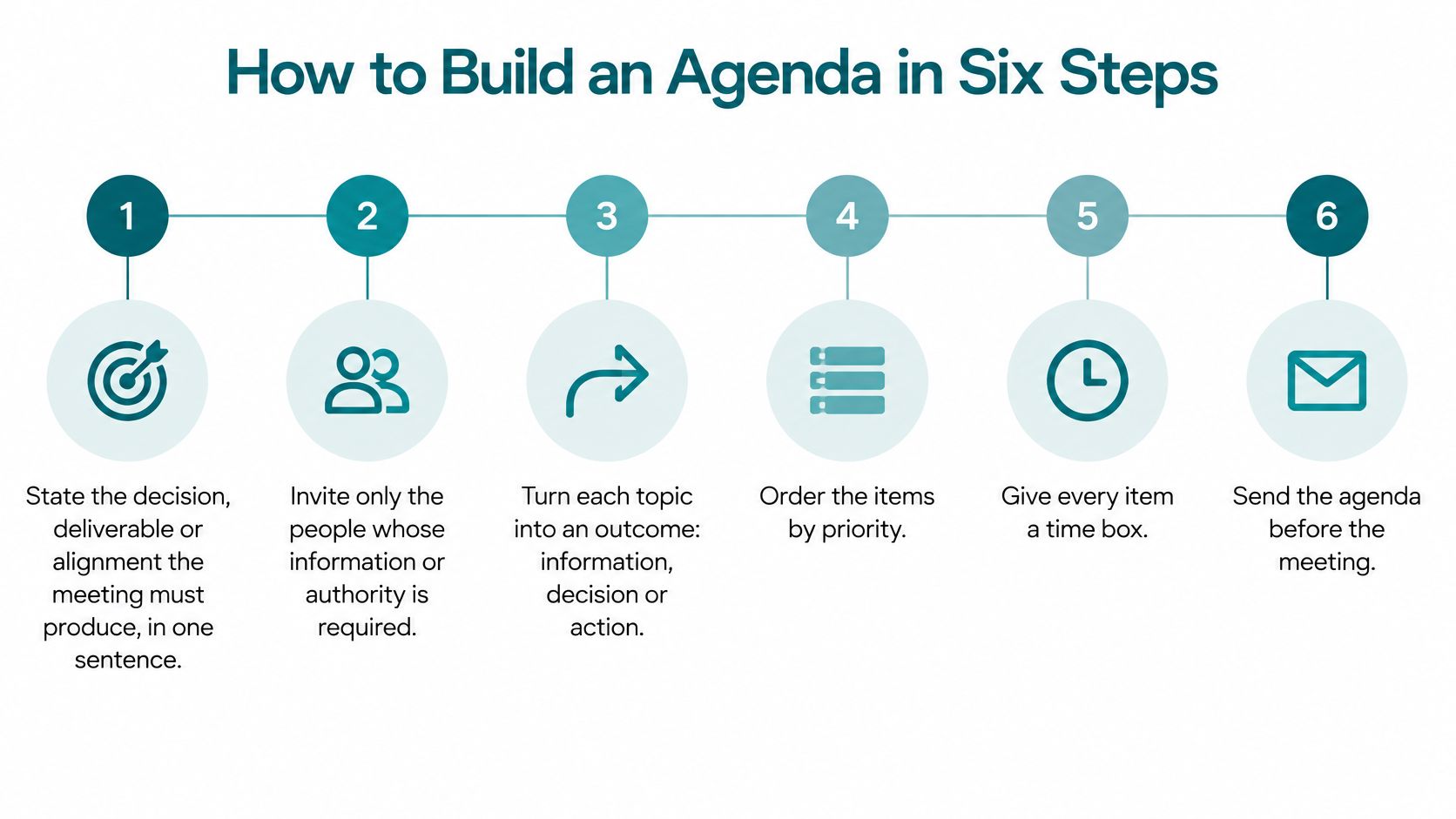
Start with the outcome, then work backward to the discussion required. The World Wide Web Consortium's meeting guidance recommends stating goals, topics, time frames, and the anticipated outcome for every topic.
Use this process as a drafting aid, not a reason to make the document longer.
Work backward from the pricing decision
- State the result in a sentence. For a product pricing meeting, write that the group must select a launch price tier for the Pro plan, with the Head of Product accountable for approval. Avoid an objective such as discussing pricing, because participants can discuss indefinitely without selecting anything.
- Invite people for their contribution or authority. Bring the Head of Product for the decision, Finance for the cost model, and Sales for customer-response evidence. Send the outcome to observers instead of asking them to attend without a defined role.
- Convert topics into outcome questions. Replace pricing options with Which launch tier meets our margin requirements without creating an unacceptable sales objection? That question tells Finance and Sales which evidence matters and gives the facilitator a boundary for discussion.
- Label the mode and prioritize accordingly. Mark items as information sharing, discussion, decision, problem solving, or brainstorming, so participants know whether they're receiving context or shaping a choice. Put only essential context before the pricing decision; don't let a routine update consume the attention needed for the harder work.
- Give each item a time box and owner. Use the duration examples below as starting points, then adjust for the unresolved trade-offs rather than the seniority of the speaker. Name the person who will lead each item and state what they must leave behind, such as an approved tier or a list of implementation assignments.
- Attach preparation and follow-through requirements. Request the cost model, sales summary, and decision criteria before the meeting, and identify who will publish the approved price afterward. Separate the person presenting the analysis from the person authorized to choose if those are different roles.
Test whether the meeting is ready
Every agenda line must answer: What must happen in the room? Who must contribute? What artifact or decision exists afterward? If an item can't answer those questions, remove it or make it asynchronous preparation.
A detailed agenda can make a meeting feel prepared without making the discussion useful. The outcome line matters more than page count, and a shared document with clear assignments is preferable to a polished presentation that nobody can act on.
Use a meeting preparation checklist to check the invite, access arrangements, materials, and preparation requests. Provide structured, readable documents, specify the time zone, and offer a written-input deadline for contributors who can't attend.
For a visual walkthrough, use this companion video.
Send the final agenda with its materials early enough for people to respond. A late attachment isn't preparation just because it arrived before the call started.
How Long Each Item Should Get
Treat meeting duration as a constraint, not a calendar default. Rev's meeting statistics report that 42% of meetings last under 30 minutes, while 39% last between 16 and 30 minutes. Those categories overlap, so they describe meeting length patterns rather than numbers to add together.
Choose the shortest session that can support the outcome. Cutting time without reducing scope pushes unfinished work into email, chat, or another meeting. I would rather protect a clean decision than squeeze status updates, presentation time, and approval into one booking.
Time split for a 20-minute and a 30-minute decision meeting
These worked examples allocate time to the decision and its execution, rather than dividing the available minutes equally. Each line should name the decision, the owner, and the output expected by the end.
Meeting length | Opening review | Core decision | Planning or owners | Read-back of owners and deadlines |
|---|---|---|---|---|
20-minute decision meeting | 2 min objective and context | 10 min decision | 5 min implementation planning | 3 min read-back |
30-minute product meeting | 5 min launch status | 15 min pricing decision | 7 min assigning owners | 3 min deadlines |
In the shorter example, the opening establishes the objective and checks whether any material facts have changed. It isn't a presentation slot. The decision block should compare viable options against criteria participants have already reviewed, with the person authorized to choose named in advance.
Implementation planning then translates the choice into work. Keep the closing read-back intact, even if the discussion becomes uncomfortable. Leaving without an accepted owner and deadline defeats the purpose of deciding.
The longer product-meeting example is a worked allocation, not a benchmark: launch status gets a little more space because readiness may change the pricing choice, while the largest block stays with pricing rather than updates. That trade-off is deliberate. Status is input; the decision is the reason everyone is present. My Hours offers broader meeting-statistics context, but the split here is an example of prioritizing decision time.
Protect the closing time
If the subject won't fit, circulate background material or separate discovery from approval. Don't split a decision merely to preserve a short booking when the same participants need to evaluate interdependent trade-offs together.
Give single-item contributors a specific arrival and departure slot. State what isn't being decided so a pricing discussion doesn't become a packaging or roadmap debate.
Time-box rule: When the discussion reaches its limit, choose explicitly between deciding, delegating missing work, and scheduling a justified continuation.
Use a clear plan to facilitate a meeting, including who watches the clock. Reserve the final minute within the closing block to confirm the decision, any open question, its responsible person, and its deadline.
Sort Each Item as Information, Decision or Action
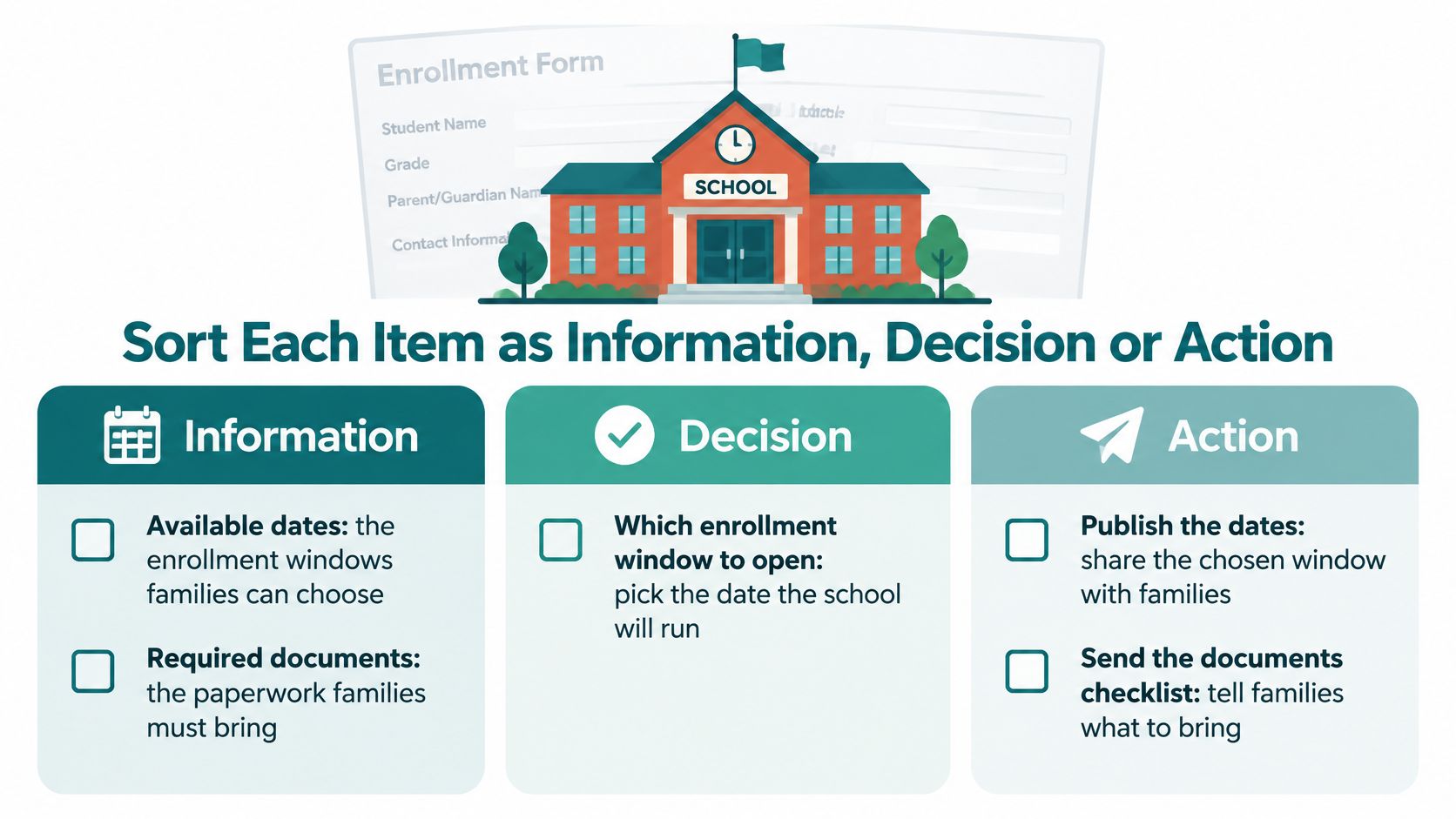
Say you're coordinating school enrollment at home. Available dates belong under information, choosing the enrollment window belongs under decision, and submitting the paperwork belongs under action. Mixing them together makes it harder to see whether you're missing facts, permission, or execution.
Use this classification before adding more discussion topics.
Give each category a different job
- Information establishes the facts. List the available enrollment dates, required documents, and transport constraints; mark settled facts as received rather than reopening them.
- Decisions resolve a choice. Ask which window the household will select, name the accountable parent, and specify when the choice must be final.
- Actions move the choice forward. Assign one person to submit the form and another to arrange transportation, with an explicit confirmation deadline.
You can add a more precise outcome label within those groups: decision, recommendation, input, information, or delegation. A recommendation needs an approver; input needs a recipient; delegation needs someone who accepts responsibility.
For committee work involving submissions or proposals, Planstone's resource lets organizers compare abstract sorting methods. That's a separate classification task, but the useful discipline is similar: establish categories before working through the material.
Make disagreement manageable
Write the decision rule before discussion starts. A designated owner may choose after hearing objections, a committee may vote, or an unresolved business issue may require executive escalation. Don't imply consensus is required when someone already has approval authority.
Reserve room for objections and trade-offs before the choice. In the enrollment example, a preferred date may conflict with transport availability; recording the concern is more useful than discovering it after submission.
Add a not-for-discussion line for settled boundaries and a parking lot for unrelated issues. Give parked items a disposition, such as written review or removal, rather than automatically creating another meeting.
According to Pumble's meeting statistics, 65% of employees report that frequent meetings prevent them from focusing on and completing their work. That's why the execution record deserves more attention than a transcript of the discussion.
Close by reading each action, owner, and due date aloud, then distribute the record immediately. A concise meeting follow-up email should make the next step obvious without requiring anyone to reconstruct the conversation.
Copy-Ready Agenda Template
Use this hypothetical product-pricing agenda as a shared working document. Replace the role-based assignments with actual names before sending it.
Title: Product pricing decision, Thursday, 30 minutes
Outcome: Select a launch price tier for the Pro plan; Head of Product owns the choice and records approval by Friday.
Attendees: Head of Product, Finance lead, Sales lead. The Head of Product also performs the product-manager role for this meeting.
Not for discussion: Packaging names and roadmap changes.
Item | Time | Owner | Required output |
|---|---|---|---|
Launch status | 5 minutes | Head of Product, acting as product manager | Confirmation that the launch date holds |
Pricing decision | 15 minutes | Head of Product | Selected tier, chosen by the owner after a 5-minute trade-off review |
Implementation owners | 7 minutes | Head of Product | Named owner each for billing, copy, and sales enablement |
Read-back | 3 minutes | Head of Product | Decision, owners, and deadlines confirmed aloud |
Pre-reads due 24 hours earlier: Finance sends a one-page cost model; Sales sends a win-rate summary.
Decision criteria: Margin requirements, customer objections, and implementation readiness.
Preparation request: Flag unsupported assumptions before the meeting.
Parking lot: Off-topic items receive a follow-up disposition.
Record: Distribute the completed agenda the same day, with implementation owners' acceptance confirmed.
Agenda Problems and Quick Fixes
Discussion drifts when nobody can point to the choice being made or the boundaries around it. A facilitator can interrupt repeatedly, but it's easier to redirect people when the agenda already states what belongs.
Diagnose the missing instruction before adding another standing meeting. Most fixes involve changing an assignment, a boundary, or the timing of preparation.
Agenda symptoms, likely gaps and fixes
Symptom | Likely agenda gap | Fix |
|---|---|---|
Discussion drifts into side topics | No stated decision or out-of-scope list | Write the decision in a sentence, list what isn't being decided, and put unrelated issues in a parking lot. |
Meeting runs over time | Topics have no time boxes | Assign minutes to each item and reserve the final minute for read-back. |
Participants arrive unprepared | Agenda or pre-read sent late | Send the agenda and materials early with explicit preparation requests. |
Same issue returns next meeting | Actions lack an owner or due date | Name an accountable person and a due date for every decision's next action. |
Too many people in the room | Observers are on the invite list | Invite only people who provide necessary input or approval, and give single-item attendees a short slot. |
Separate immediate changes from preparation habits
You can add boundaries, time boxes, and action owners to the very next agenda. A parking lot and a not-for-discussion line can contain drift during that meeting, provided the facilitator enforces them.
Earlier preparation needs a full cycle to test. Moving the send date won't help if contributors still submit incomplete materials or participants don't know which questions they must answer.
Don't mark an action complete because someone agreed to it. Mark it complete when the named output exists.
Allow a few cycles to judge the preparation habit, and inspect the cause when it fails. An inaccessible attachment, missing assumption, or vague request needs a different fix from someone not reading.
Extra attendees also create work outside the meeting. Someone must reconcile calendars, handle rescheduling, distribute revisions, and explain changes; the labor-cost issues described by WorkLife's analysis of meeting costs make attendance discipline an operational concern, not just etiquette.
Don't remove someone whose expertise could change the decision merely to shrink the room. Request their input asynchronously or give them a defined contribution window, then make sure the decision-maker receives it.
Send the Agenda 24 Hours Before Your Next Meeting
Pick an upcoming meeting and set a practical sending deadline: 24 hours before it starts. Treat that as your operating target, not a claim that every subject needs the same preparation window. Complex choices may require earlier circulation.
Write the intended outcome before opening a template. If you can't explain what participants will produce, resolve that uncertainty before asking them to prepare.
Make the preparation request explicit
- Draft the decision path. Use the six-step process to identify the necessary contributors, discussion modes, item owners, and outputs.
- Allocate the available minutes. Protect the decision and implementation work instead of filling the calendar block with updates.
- Send actionable materials. Tell each attendee what to review, which assumption to test, and where to submit objections.
- Close the loop. Read back the assignments and distribute the completed record the same day.
Keep the agenda and outcome record together. Participants shouldn't have to search through a calendar invitation, chat thread, and separate notes document to find the approved choice.
After two or three cycles, review decisions made in the room, actions completed on time, and follow-up meetings avoided. Use those measures as a diagnostic, not a score to game: a justified deferral is better than an unsupported decision.
Your next action is simple: open the next meeting invite, replace its topic list with the required outputs, and schedule the agenda's send time. If materials are missing, name who must supply them before that deadline instead of accepting another live document-review session.
Approved Lux Personal Assistant offers booking, rescheduling, and de-conflicting appointments, plus deadline and renewal reminders sent before they're due. If calendar coordination keeps crowding out preparation, visit Approved Lux Personal Assistant to explore handing that operational work to our Assistant team.